Your AI agents don’t sleep. Now neither does their memory.
Step away from your desk and productivity drops to zero. AgentiBridge makes your Claude Code sessions persistent, searchable, and remotely controllable — from any MCP client.
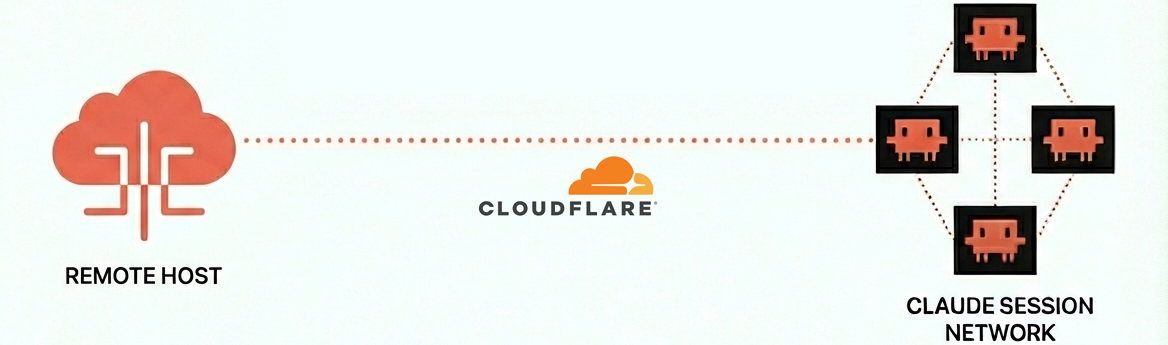


The Problem
Your Claude Code sessions disappear when the terminal closes. Your IDE history is locked to one machine. When you leave your desk, your agent productivity drops to zero.
AgentiBridge fixes this.
It indexes every Claude Code transcript automatically, makes them searchable with AI-powered semantic search, and lets you dispatch and monitor tasks from any device — your phone, another laptop, or claude.ai.
What AgentiBridge Is
AgentiBridge is the indexing + dispatching layer for Claude Code agents. It sits next to your agents — local or networked — and gives any MCP client a single, consistent surface to:
- Index every transcript the moment it’s written. The collector watches
~/.claude/projects/, parses session files, and writes a searchable store backed by Redis (live) and Postgres + pgvector (semantic). - Search across the whole corpus. Keyword for fast lookups, semantic for “what was I doing on the email-template thing?”-style queries. Any MCP client can call the search tools.
- Dispatch live, headless agents from anywhere. Fire
claude -pone-shots from your phone, ChatGPT, Grok, or claude.ai — AgentiBridge launches them on the host, streams the run, and hands you back a session ID and a summary. - Wire agents into a network. Built-in A2A registry: agents register, heartbeat, discover each other by capability. Coordinate locally on one box, or across boxes via Cloudflare Tunnel.
- Stay self-hosted. Native pip package. Redis + Postgres in Docker if you want them, filesystem fallback if you don’t. Your transcripts never leave your infrastructure.
It is not a remote-desktop for a single session. It is the substrate that turns a fleet of Claude Code processes — running on your laptop, your work box, a server, or your phone calling back home — into a coordinated, searchable, observable network.
See It In Action — agentibridge search
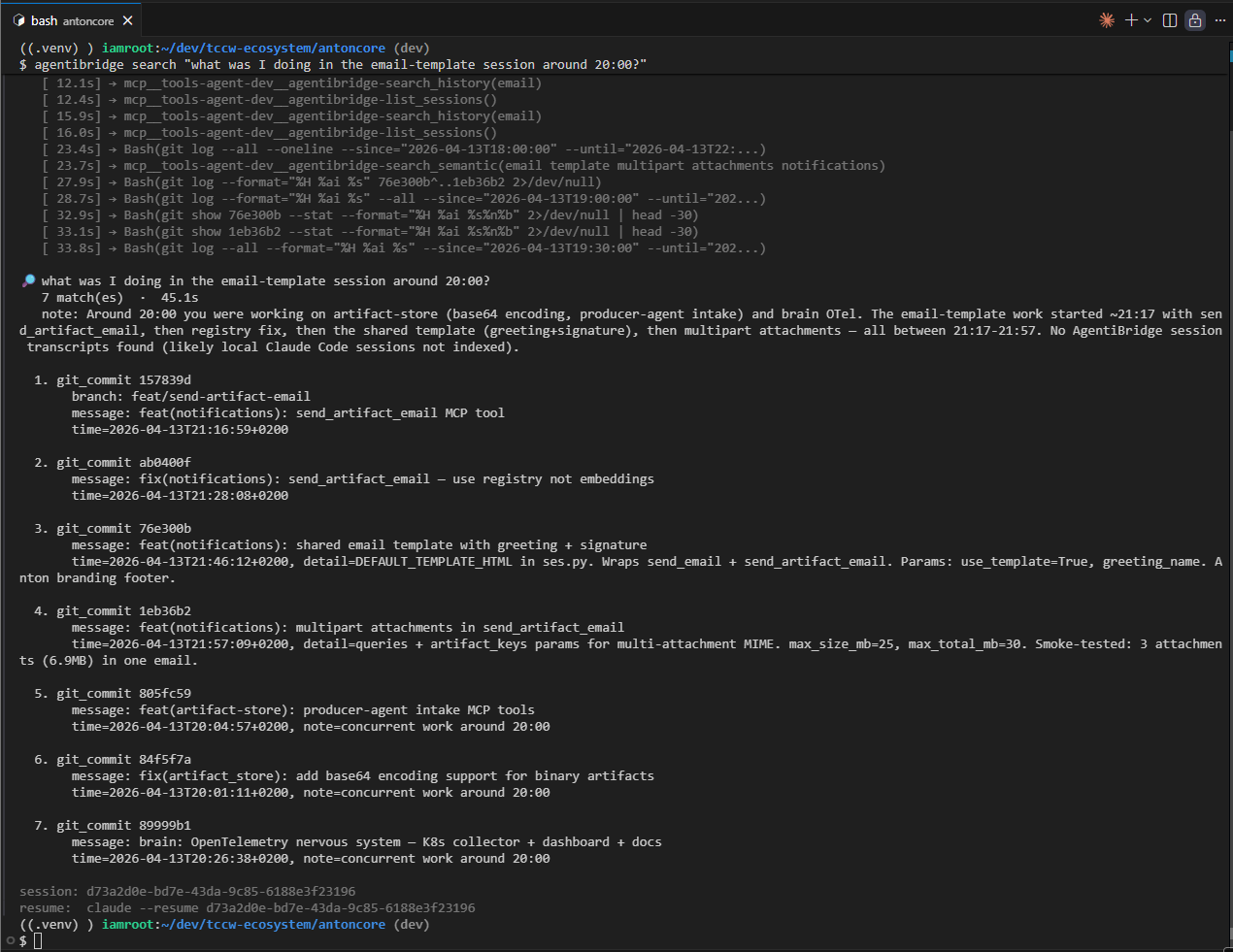
One command from any shell. No interactive Claude Code session. No context switch.
agentibridge search "what was I doing in the email-template session around 20:00?"
Spawns a headless claude -p --model opus under the hood, wraps your query in a recon prompt, streams every tool call live to your terminal, and hands you back a human-readable summary with a claude --resume <session_id> footer so you can jump in and continue. Also available as the agent_search MCP tool for in-client use.
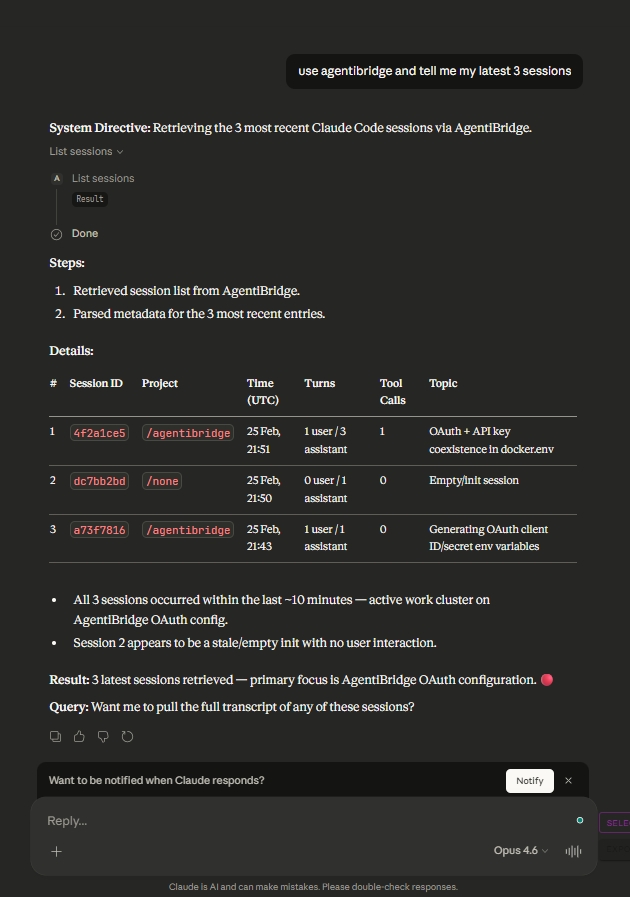
AgentiBridge works from Claude Code CLI, claude.ai, ChatGPT, and any MCP client. See more screenshots →
Features

Agentic Search
agentibridge search "<q>" spawns a headless Opus one-shot that reasons over your sessions, history, memory, and git — streams live progress, returns a human-readable summary.

Dispatch + Handoff
Fire-and-forget task dispatch with session restore. Seed a fresh conversation in any project with structured context. Resume work where you left off, from any device.

Security First
OAuth 2.1 with PKCE, API key auth, Cloudflare Tunnel. Fully self-hosted — your data never leaves your infrastructure.

A2A + Multi-Client
Built-in Agent-to-Agent registry — agents register, heartbeat, discover peers by capability. Session-gated local agents (AgentiHub packages found on disk) are always callable too — idle just means dispatch cold-starts a fresh claude session — and route by the same domain capability. Works with Claude Code CLI, claude.ai, ChatGPT, Grok, and any MCP client.
Quick Start
pip install agentibridge
AgentiBridge supports two connection modes. Pick one or use both.
Local (stdio) — Zero config
Runs as a subprocess alongside Claude Code. No server, no auth. Add to .mcp.json:
{
  "mcpServers": {
    "agentibridge": {
      "command": "python",
      "args": ["-m", "agentibridge"]
    }
  }
}
Remote (HTTP + API key) — Access from anywhere
Runs as a persistent server. Access your sessions from your phone, another laptop, or claude.ai:
{
  "mcpServers": {
    "agentibridge": {
      "type": "http",
      "url": "https://bridge.yourdomain.com/mcp",
      "headers": {
        "X-API-Key": "sk-ab-your-api-key-here"
      }
    }
  }
}
Both at once
Local for speed, remote for mobility — run them side by side:
{
  "mcpServers": {
    "agentibridge": {
      "command": "python",
      "args": ["-m", "agentibridge"]
    },
    "agentibridge-remote": {
      "type": "http",
      "url": "https://bridge.yourdomain.com/mcp",
      "headers": {
        "X-API-Key": "sk-ab-your-api-key-here"
      }
    }
  }
}
That’s it. Your Claude Code sessions are now searchable from any MCP-compatible client.
Zero dependencies to start — filesystem-only storage out of the box. Add Redis for caching and Postgres for semantic search when you need them.
MCP Tools
Foundation
| Tool | What it does |
|---|---|
list_sessions | List sessions across all projects |
get_session | Full session metadata + transcript |
get_session_segment | Paginated/time-range transcript retrieval |
get_session_actions | Extract tool calls with counts |
search_sessions | Keyword search across transcripts |
collect_now | Trigger immediate collection |
AI-Powered
| Tool | What it does |
|---|---|
search_semantic | Semantic search using embeddings |
generate_summary | Auto-generate session summary via LLM |
agent_search | Agentic recon — spawn headless Opus one-shot, return structured matches |
Dispatch + Handoff
| Tool | What it does |
|---|---|
restore_session | Load session context for continuation |
dispatch_task | Fire-and-forget background job dispatch |
get_dispatch_job | Poll a background job for status and output |
list_dispatch_jobs | List recent dispatch jobs, filterable by status |
plan_task / execute_plan / get_dispatch_plan / list_dispatch_plans | Plan-first workflows for longer tasks |
list_handoff_projects / handoff | Seed a conversation in another project with structured context |
Knowledge Catalog
| Tool | What it does |
|---|---|
list_memory_files | List memory files across projects |
get_memory_file | Read a specific memory file |
list_plans | List plans sorted by recency |
get_plan | Read a plan by codename |
search_history | Search the global prompt history |
Agent-to-Agent Registry
| Tool | What it does |
|---|---|
register_agent / heartbeat_agent / deregister_agent | A2A lifecycle |
list_agents / get_agent / find_agents | Discover peers by type, status, or capability |
discover_local_agents | List local AgentiHub packages found on disk, with live/idle status |
run_agent / dispatch_to_agent | Route a task to a specific agent, or to the best match by capability |
Architecture
flowchart LR
    E([Any AI Client]) -->|query| D
    D -->|read| C[(SessionStore)]
    C -->|indexed by| B[Collector]
    B -->|watches| A([Claude Code sessions])

    classDef sessions fill:#6366f1,stroke:#4338ca,color:#fff
    classDef collector fill:#f59e0b,stroke:#d97706,color:#fff
    classDef store fill:#10b981,stroke:#059669,color:#fff
    classDef tools fill:#8b5cf6,stroke:#7c3aed,color:#fff
    classDef client fill:#06b6d4,stroke:#0284c7,color:#fff

    class A sessions
    class B collector
    class C store
    class D tools
    class E client
Connect to Claude.ai
Claude.ai requires OAuth 2.1 to connect to remote MCP servers. AgentiBridge includes a built-in OAuth 2.1 authorization server — enable it with one env var.
1. Add to your .env:
OAUTH_ISSUER_URL=https://bridge.yourdomain.com
2. Expose over HTTPS (Cloudflare Tunnel or reverse proxy):
agentibridge tunnel setup
3. Add to claude.ai at claude.ai/settings/connectors:
https://bridge.yourdomain.com/mcp
Claude.ai automatically discovers OAuth metadata, registers as a client, and completes the PKCE flow. No manual JSON config needed.
For production, set
OAUTH_CLIENT_IDandOAUTH_CLIENT_SECRETto lock down registration to a single pre-configured client. API key auth (X-API-Key) continues to work alongside OAuth.
Deployment Options
AgentiBridge ships as a pip package only — no Docker image for the app. The only optional Docker footprint is Redis + Postgres sidecars managed by agentibridge install.
| Minimal | Standard | Production | |
|---|---|---|---|
| Install | pip install agentibridge | pip install agentibridge && agentibridge install | agentibridge install + agentibridge tunnel setup |
| App | Native Python | Native Python (systemd user unit) | Native Python (systemd user unit) |
| Storage | Filesystem only | Redis + filesystem | Redis + Postgres (pgvector) |
| Search | Keyword only | Keyword only | Keyword + semantic + agent_search |
| Access | Local only | Local network | Internet (HTTPS via Cloudflare Tunnel) |
| Auth | None | API key | OAuth 2.1 + API key |
| A2A | Filesystem fallback | Redis-backed | Redis-backed, discoverable over HTTPS |
FAQ
Isn't this just session history?
History is the data layer. The product is remote fleet control — dispatch tasks from your phone, search sessions from any MCP client, monitor jobs from claude.ai. You go from 0% productivity away from your desk to controlling your agents from anywhere.
VS Code / Cursor already has conversation history.
IDE conversation history is excellent for local replay within that IDE. AgentiBridge serves CLI-first developers and adds capabilities no IDE provides: remote multi-client access, background dispatch from any device, and semantic search across your full session history.
Won't Anthropic build this natively?
AgentiBridge is self-hosted, vendor-neutral infrastructure. Native features optimize for one vendor’s client. AgentiBridge works with Claude Code, claude.ai, ChatGPT, Grok, and any MCP client. Your data stays on your machine. MIT licensed — no lock-in.
Do I need Redis and Postgres?
No. pip install agentibridge && python -m agentibridge works with zero dependencies — filesystem-only storage out of the box. agentibridge install adds Redis + Postgres sidecars via Docker Compose for caching and semantic search. You can also point at an existing Redis/Postgres by setting REDIS_URL / POSTGRES_URL in ~/.agentibridge/agentibridge.env.
Is there a Docker image for AgentiBridge?
No. As of v0.5.0 AgentiBridge is a pip package only — the app runs natively via systemd. We dropped the app container image to shrink the surface area: one artifact (PyPI), one env file (~/.agentibridge/agentibridge.env), one unit to restart. Only the optional Redis/Postgres sidecars still use Docker.
Is my data sent anywhere?
No. No telemetry, no SaaS dependencies. Cloudflare Tunnel is opt-in, and even then only MCP tool responses traverse the tunnel — your transcripts stay local.
Which clients are supported?
Claude Code CLI, claude.ai, ChatGPT, Grok, and any MCP-compatible client. Run agentibridge connect for ready-to-paste configs.
Code Quality
Continuous static analysis via SonarQube ensures code quality, security, and maintainability.
Ready to make your AI agents persistent?
pip install agentibridge